
What Does Live Activities Mean on iPhone? It's a Feature You’re Probably Already Using
Live Activities show real-time updates on your Lock Screen, but many iPhone users don’t realize what they’re seeing.
Published Jan. 23 2026, 11:29 a.m. ET

If you’ve ever glanced at your iPhone Lock Screen and seen a timer, delivery tracker, or sports score updating in real time, you’ve already encountered Live Activities. The feature appears quietly, without much explanation, which has left many users wondering what it actually does and whether it’s something they turned on by accident.
Questions about what Live Activities mean on iPhone often come up after a new app update or system change. While it can look unfamiliar at first, the feature is intentional and designed to surface useful information without forcing users to open an app repeatedly.
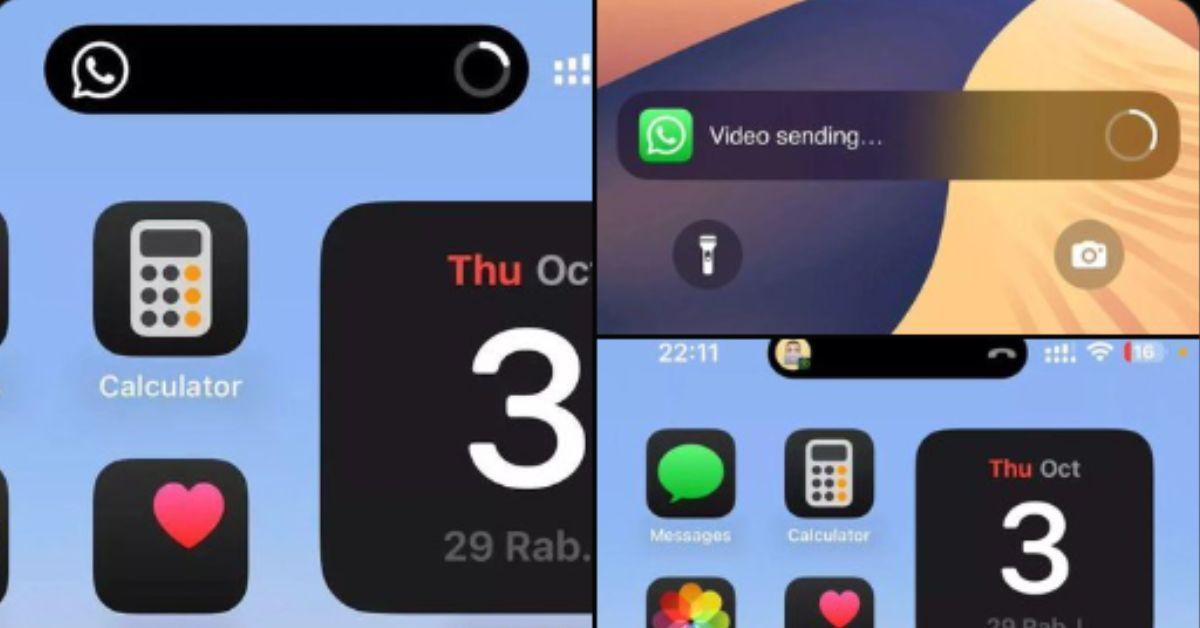
Live Activities on iPhone with WhatsApp
What does Live Activities mean on iPhone?
Live Activities is an iOS feature introduced by Apple that allows apps to display real-time information directly on the Lock Screen and, on supported devices, in the Dynamic Island. Instead of sending repeated notifications, apps can show ongoing updates in a single, persistent view.
This means you can track progress at a glance, whether it’s a food delivery, workout timer, navigation directions, or live sports scores.
According to Apple support discussions and developer documentation, Live Activities are meant to reduce notification overload. Rather than buzzing your phone every few minutes, the app updates the same visual element as information changes.
Users remain in control. Live Activities can be enabled or disabled on a per-app basis through iPhone settings.
Live Activities are time-sensitive by design. They appear only while an activity is relevant and automatically disappear when it ends. For example, once a delivery arrives or a timer finishes, the Live Activity closes without requiring user input.
This temporary nature is why some users notice the feature only occasionally and forget it exists until it pops up again.
How apps use Live Activities and why some users find them confusing.
Apps that rely on real-time updates benefit the most from Live Activities. Fitness apps use them for workout tracking, ride-share apps for arrival times, and sports apps for live scores. Marketing platforms and developers note that Live Activities improve engagement by keeping information visible without disrupting the user.
However, some users report confusion because the feature isn't available for all apps, and sometimes the live update gets stuck long after the activity is done.
Reddit discussions show that many users initially mistake Live Activities for a new type of notification or background tracking. Others worry it may affect battery life. Apple has stated that Live Activities are optimized to minimize power usage and pause when the phone is locked or inactive for extended periods.
Still, awareness and opinion of the feature remain uneven.
Here's how to manage or turn off Live Activities on your iPhone.
Live Activities can be managed in the iPhone Settings app under Notifications, where users can toggle the feature on or off globally or adjust settings for individual apps. If you prefer a quieter Lock Screen, disabling Live Activities prevents apps from displaying ongoing updates.
For users who rely on real-time tracking, leaving the feature on can be a convenience rather than a distraction.
Live Activities are one of those iPhone features that blend into daily use without calling attention to themselves. Once you understand what they are, they’re less mysterious and more practical. The real question becomes whether you want your phone quietly keeping you updated, or if you’d rather keep your Lock Screen as simple as possible.