
Instagram New Instants Feature Is Designed to Let Users Get More Real — How It Works!
Instagram Instants are designed to let you be a little less filtered.

Published May 14 2026, 10:15 a.m. ET

For years now, one of the chief criticisms of Instagram has been that the app isn't a reflection of real life. The many filters and edits that users make to their photos create a filtered version of reality that can be impossible to live up to for regular people.
In response to that criticism (although they never announced that officially), Instagram has launched a new feature called Instants.
Instants are designed to capture unfiltered, real moments from your day-to-day life that can be shared with friends or mutuals. Here's what we know about the feature, including where you can find it.
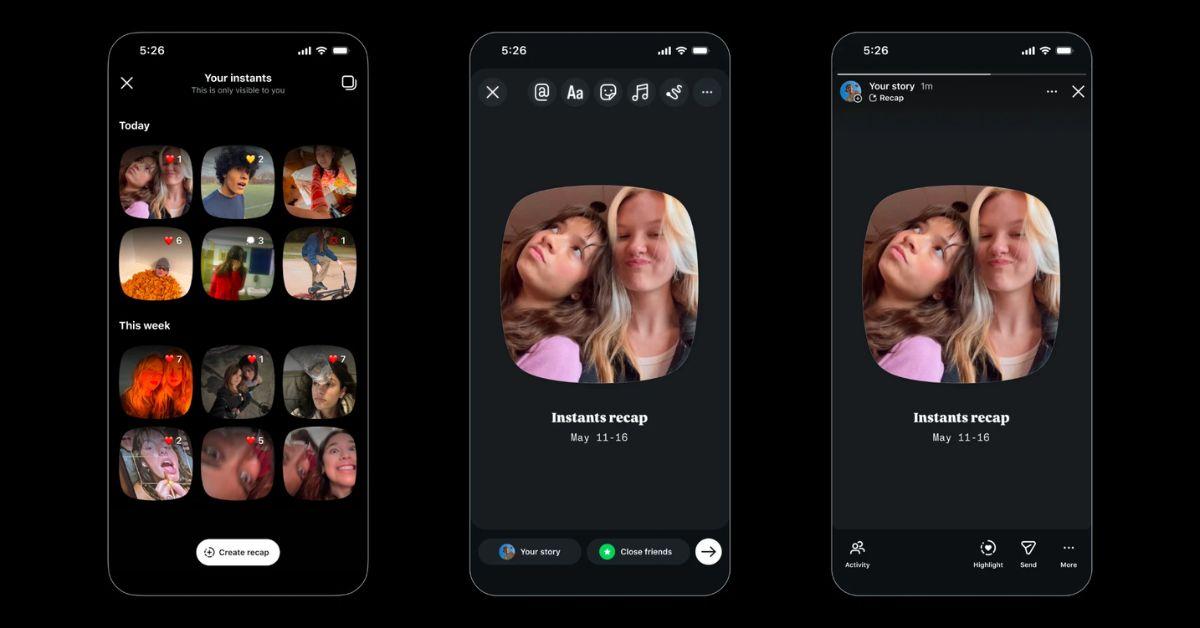
Here's how to see Instagram Instants:
You can see Instagram Instants by navigating to your inbox in the app and then clicking on the stack of photos in the bottom right corner.
You can add a caption, but can't make any additional edits, and you can also decide whether to share the photo with your close friends or with followers who follow you back.
The photos will disappear from those who viewed them after they see them, but they can reply or react first.
You can tap the white button to share as many times as you want, and there's also an undo button that will allow you to instantly undo sharing a photo if you decide you don't want to.
Your Instants are then stored in a private archive where you can continue to view them for up to a year, although they won't be available to anyone else. You can also compile instants from your archive into a recap and post to stories for all of your followers. Just tap “Create recap” in your archive."
In select countries, Instants will also be available as a standalone app that is separate from Instagram.
"The app gives you immediate access to the camera — just log in with your existing Instagram account. Instants you share on the separate app will show up for friends on Instagram and vice versa. We’re trying this separate app out to see how our community uses it, and we’ll continue to evolve it as we learn more," Instagram explained.
Here's how to get rid of Instagram Instants:
Although the feature could not be disabled while it was in beta, there is now a way to turn Instagram Instants off entirely through your Settings.
If you go to Content Preferences under settings, you should see a toggle that says "hide Instants in inbox." This will remove the photo stack from the corner of your inbox so that it doesn't get in the way of your ability to access your messages.
If you want to turn off notifications for Instants, you'll need to go to your settings and then to Notifications to do that. So it's a two-step process, but one that might be worth it if you want to forget that this particular feature even exists. Of course, if you just want to get rid of the photos waiting for you, all you would need to do is take a look at them.