
What Does Couldn’t Load Discover Mean on Google and Why the Error Keeps Showing Up
That frustrating Discover error isn’t random. Here’s what users have to say about this error message.
Published Feb. 6 2026, 3:42 p.m. ET

If you’ve ever opened your phone, swiped over to Google Discover, and been greeted with a message like “couldn’t load Discover” or “something went wrong,” you probably paused and thought … What does that even mean?
It feels vague. It’s not helpful. And, for a lot of people, it seems to pop up out of nowhere. Over the years, Google users have turned to forums, support threads, and social media looking for answers, wondering if it’s a glitch, a setting issue, or something bigger going on behind the scenes.
The good news is that it’s usually not permanent. The less good news? There isn’t just one single answer to what the error message “couldn’t load Discover” on Google might mean.
What does couldn’t load Discover mean and why does it usually happen?
In most cases, the error simply means Google Discover isn’t able to pull in content properly at that moment.
According to troubleshooting guides such as Android Authority, it often comes down to basic issues like app glitches, network problems, or settings being turned off without realizing it. Discover relies heavily on the Google app working smoothly and having a stable internet connection. If either of those hiccups, the feed may fail to load.
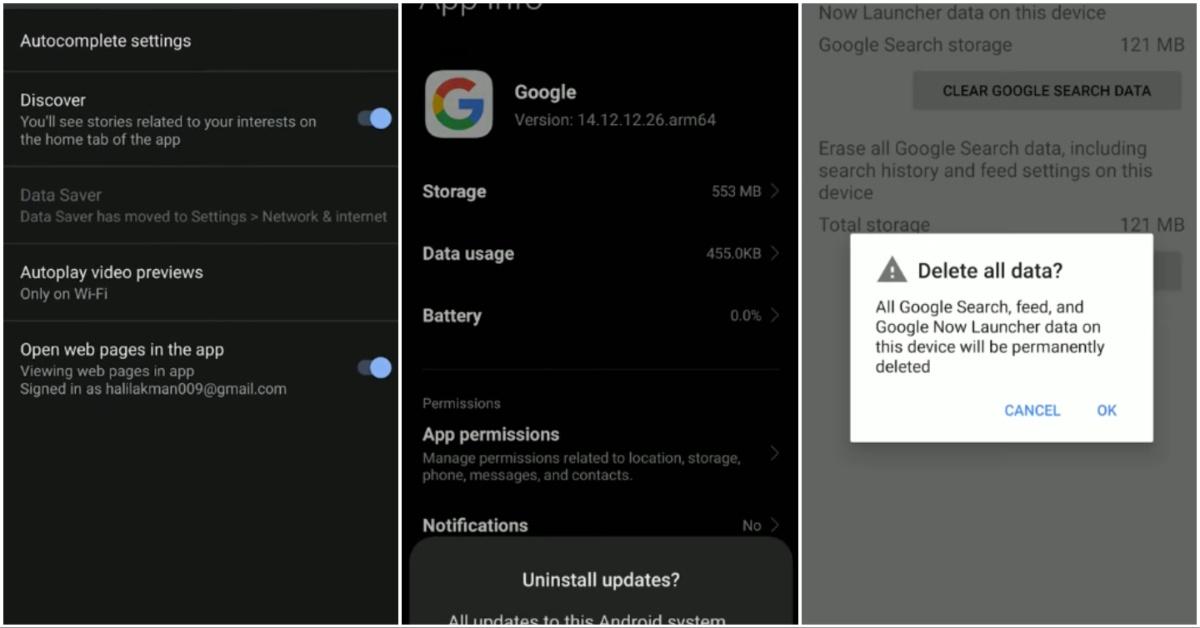
Some of the most common fixes people have success with include restarting their phone, switching between Wi-Fi and mobile data, and checking to make sure Discover is actually enabled in the Google app settings.
Others find that simply force-closing the app, clearing its cache, or installing pending updates can bring the feed right back.
There are also times when the problem isn’t on your phone at all. If Google’s servers are experiencing issues, Discover may not load properly until things are fixed on their end.
In short, the message usually points to a temporary technical problem rather than anything being permanently broken.
Many users have been seeing this error for years.
What surprises a lot of people is that this isn’t some brand-new issue.
As far back as 2023, users were already posting in Google support forums asking why their Discover feed suddenly stopped working. In many of those threads, people described the same vague error message and frustration over not getting clear answers.
Some never received a definitive explanation, while others eventually saw the problem resolve itself after updates or time passed.
Over on Reddit and Android-focused forums, similar stories keep popping up. People report Discover working fine one day and refusing to load the next, sometimes right after a Google app update.
In some cases, uninstalling the most recent update temporarily fixed the issue until Google rolled out a new patch. That’s led many users to believe that certain updates occasionally introduce bugs that disrupt Discover’s functionality.
So if you’re seeing the error now, you’re far from the only one who’s run into it.
Network and location issues can also play a role.
Interestingly, a few users noticed that their Discover feed stopped working when they traveled or switched networks.
One person shared on Stack Exchange that Discover wouldn’t load while they were in a different state, but the moment they returned home, everything started working again. Others mentioned that using a VPN or changing networks seemed to make the feed reappear.
That suggests that location-based services, network routing, or temporary connection problems can sometimes interfere with how Discover pulls content.
It doesn’t mean Discover is blocked in certain places. It’s more likely that certain network conditions just don’t play nicely with the app at times.
Switching between Wi-Fi and mobile data is often one of the quickest ways to test whether that’s the culprit.
Basic troubleshooting usually fixes the problem.
Across support threads from Google, Samsung, and Android communities, the same simple steps come up again and again.
Restarting your device is often the first suggestion, since it clears temporary software glitches.
Checking that Discover is turned on in the Google app settings is another easy one people sometimes overlook.
Clearing the app’s cache can help if stored data becomes corrupted.
And keeping the Google app updated ensures you’re running the latest fixes and improvements.
If Discover broke after an update, some users temporarily uninstall the latest version until a new patch rolls out, though that’s more of a workaround than a long-term solution.
So, should you be worried if Discover won’t load?
For most people, no.
The “couldn’t load Discover” message usually points to a short-term technical issue, not a serious problem with your phone or account. It’s annoying, sure, but it rarely lasts forever.
Between app updates, quick setting checks, and basic troubleshooting, Discover typically comes back on its own or with minimal effort.