
How to Get Rid of Tako: TikTok Chatbot Has Users Wanting an off Switch That Isn’t There
TikTok’s unwanted AI helper keeps popping up and users just want it to go away.
Published Feb. 4 2026, 12:24 p.m. ET

If you are sick of accidentally clicking the Tako button on your FYP while scrolling TikTok, you aren’t the only one. That little AI helper has been popping up all over the app. Most users find Tako to be more annoying than helpful. Likewise, some argue they never agreed to wanting an AI chatbot in the first place.
Unsurprisingly, this has resulted in many users wanting to know the same thing: how to get rid of Tako on TikTok. Unfortunately, this isn’t as simple as toggling a switch off in your settings. While there is a way to tone Tako down a bit, it appears as if this is a TikTok feature users are stuck with. Keep reading for the details on what we know about TikTok’s AI chatbot.
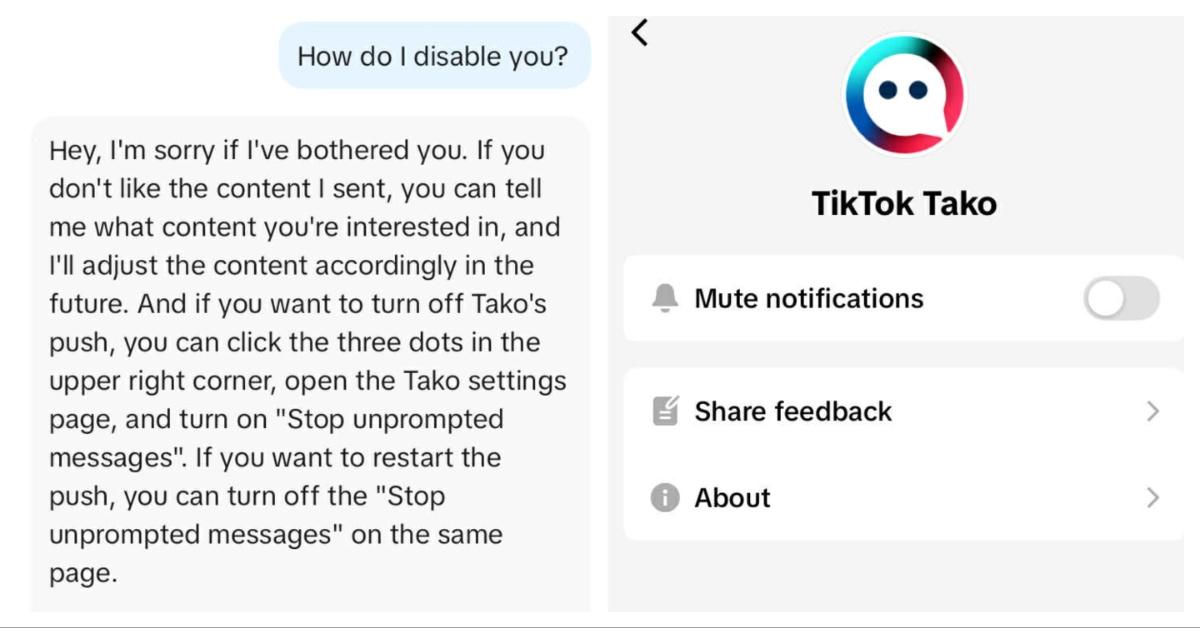
TikTok users have been trying to figure out how to get rid of Tako since the feature first showed up.
Tako is TikTok’s built-in AI assistant. It’s meant to help answer questions, suggest content, and pop up when you’re searching for things. In theory, it sounds helpful. In reality, a lot of people feel like it gets in the way.
Since it first appeared, users have been digging through menus, toggling random settings, and even asking Tako itself how to turn it off. The responses haven’t been very helpful. When asked directly, Tako apologizes for being annoying or unhelpful before pointing users in the direction of settings that don’t exist as a way to turn it off.
The lack of a clear way to turn this feature off has resulted in the question continuing to pop up on Reddit and other social media platforms as users desperately try to get this chatbot off of their FYP.
There is a setting that can tone Tako down just a little bit.
The closest thing users have found to a workaround lives inside TikTok’s settings. If you go to Settings, scroll to Content and Display, then tap on Playback, you’ll see an option called Display Object Tags.
Turning that toggle off seems to quiet Tako down for some people. It doesn’t erase it from the app, but it can make it pop up less often. Think of it more like turning down the volume instead of muting it completely.
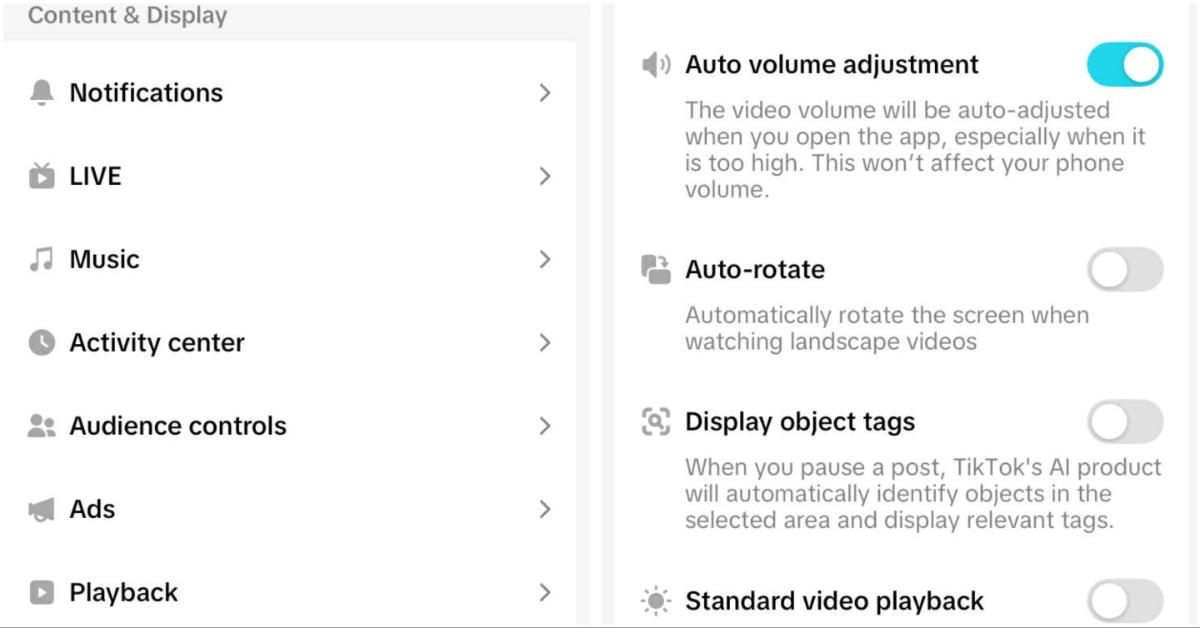
Based on what users have shared, Tako still exists in the background even after this change. It just feels a little less in your face, which for many people is better than nothing.
Right now, the best advice floating around is to turn off the Display Object Tags toggle. If Tako really bothers you, submit a support ticket to TikTok. Some users suggest telling support that they never agreed to have AI on their account and don’t see an option to turn it off.
There’s no guarantee that will change anything, but it’s one of the only steps people feel like they can take.
The general feeling seems to be that TikTok hasn’t given users a true choice to remove the AI feature from their accounts. It’s there, and for now, it looks like it’s staying.
Because of that, many people believe Tako is meant to be a permanent part of the app, even if not everyone wants it.